Command-line parameters
| Parameter | Effect |
|---|---|
-r | Start recording |
-t [time] | Recording duration in seconds |
-o [filename] | Name of the target file |
-m | Minimize the app at startup |
--minimode [0|1] | Minimize mode: 0 is normal, 1 minimizes to the system tray |
Example:
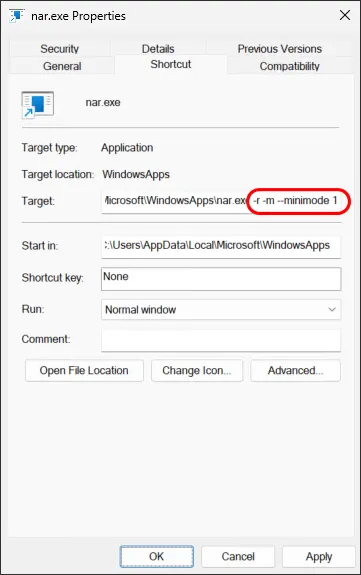
nar.exe -r -t 3600 -o "e:\schedule.mp3" -m --minimode 1
This command starts NowSmart Audio Recorder, records to e:\schedule.mp3 for 3600 seconds (one hour), and minimizes the app to the system tray.
The parameters -t and -o are optional. If Auto Name is enabled, -r alone starts recording as soon as NowSmart Audio Recorder opens.
Create a desktop shortcut
A desktop shortcut starts NowSmart Audio Recorder with recording already running.
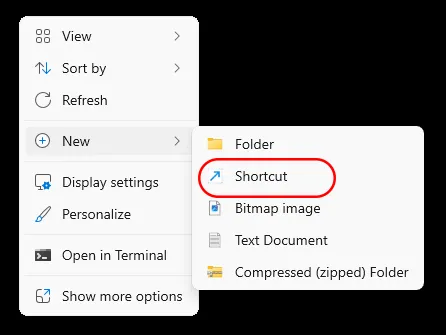
Right-click an empty area of the desktop and select New > Shortcut.
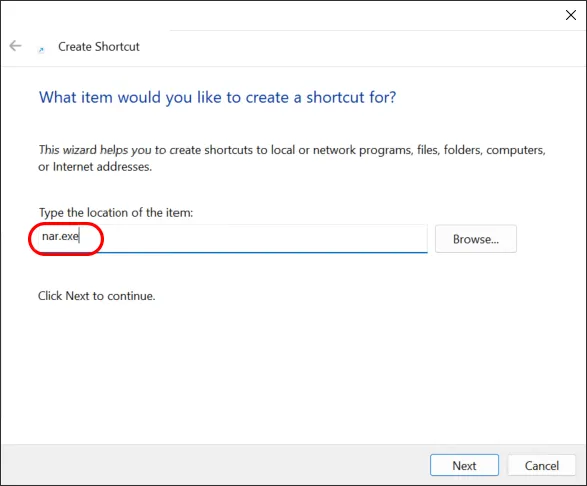
Enter nar.exe as the location, click Next, and name the shortcut.
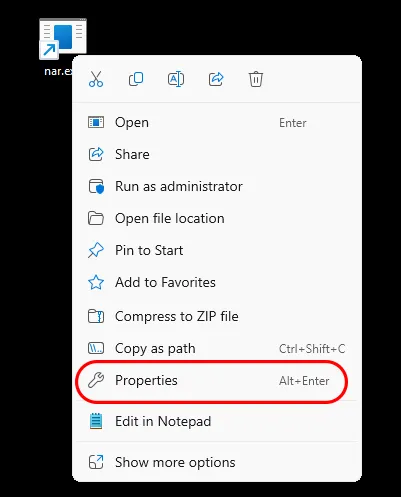
Right-click the new shortcut and select Properties.
Add your parameters to the Target field. You may need to put the program path in quotes (").
Related articles
Still need help? Browse all NowSmart Audio Recorder articles or contact support.
Start with the free version
The free version of NowSmart Audio Recorder records up to 5 minutes per file. NowSmart Audio Recorder Pro removes the limit and adds Trim for a one-time USD 9.99.