First, make sure the right recording source is selected. If it is, read on.
Why the error appears
NowSmart Audio Recorder records through the standard Windows audio API. When it sends a request to the audio driver, the driver returns the error code 0x88890008. Windows gives NowSmart Audio Recorder no further detail, so the exact reason is hard to find. The main causes are:
- A virtual audio device.
- Audio software that works at the hardware level, such as Nahimic.
- A corrupted audio driver, or a driver that does not support this feature.
- Wrong system settings.
Fixes
- For causes 1 and 2, disable the device or software, restart the computer, and try again.
- For cause 3, reinstall the audio driver.
- For cause 4, change the device’s default format as described below.
Change the device’s default format
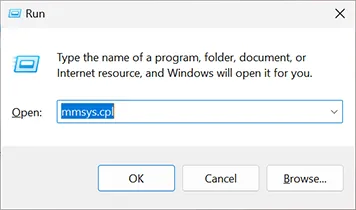
Open the Windows Sound control panel: press Win + R, type mmsys.cpl, and press Enter. On some Windows 10 versions you can also right-click the speaker icon in the taskbar and select Sounds.
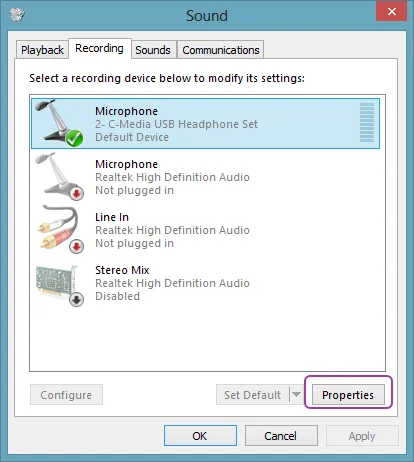
Right-click the audio device and select Properties.
Go to the Advanced tab.
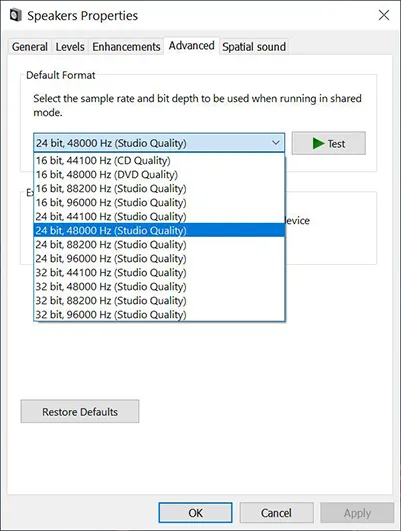
Try each of these formats that the list offers, and test recording after each change:
- 16 bit, 44100 Hz
- 16 bit, 48000 Hz
- 24 bit, 44100 Hz
- 24 bit, 48000 Hz
- 32 bit, 44100 Hz
- 32 bit, 48000 Hz
Note: The Sound control panel is part of Windows, not part of NowSmart Audio Recorder.
Related articles
Still need help? Browse all NowSmart Audio Recorder articles or contact support.
Start with the free version
The free version of NowSmart Audio Recorder records up to 5 minutes per file. NowSmart Audio Recorder Pro removes the limit and adds Trim for a one-time USD 9.99.