Recording needs the hardware, the driver, the Windows audio system, and NowSmart Audio Recorder to work together. A problem in any of them can stop recording, even if you have not changed the app’s settings. Check them in this order.
Step 1: Check the audio hardware and driver
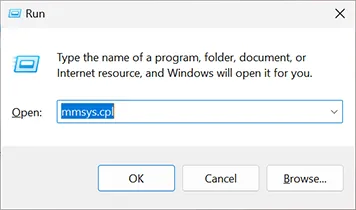
Open the Windows Sound control panel: press Win + R, type mmsys.cpl, and press Enter. On some Windows 10 versions you can also right-click the speaker icon in the taskbar and select Sounds.
On the Playback or Recording tab, check that the device you want works. The green bars next to a device move when it receives audio; if they move, the hardware works.
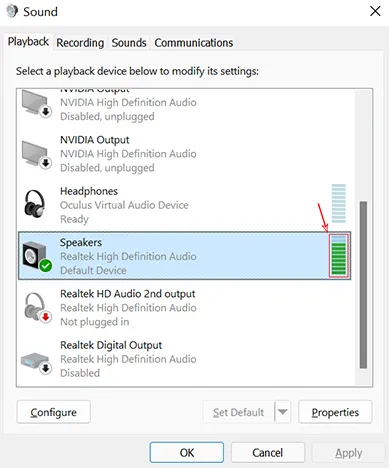
Note: The Sound control panel is part of Windows, not part of NowSmart Audio Recorder.
Common hardware problems:
- A plug is loose or in the wrong jack. Make sure every plug is firmly in the right jack.
- The audio driver is corrupted. Reinstall or update the driver for your audio hardware.
- A virtual audio device is installed. Disable it and try again; these drivers are often made for specific software and may not work with others.
- Error 0x88890008 means the device is working in an unsupported audio format. See Error code 0x88890008.
When the audio hardware works, continue with step 2.
Step 2: Check the settings in NowSmart Audio Recorder
- Recording stops early, but what was recorded sounds fine. Click Options and check the VAS and FLL settings. Turn them off if you do not need them.
- The recorded file is empty (zero bytes). The disk may be full, or the file cannot be written. Choose another folder for your recordings.
- The recording is distorted or clipped. Make a test recording and adjust the recording level so the sound is neither too loud nor too quiet. Then go to Options > Effects and turn off Audio Gain Control and Noise Suppression Mode, which do not suit every recording.
If the problem persists
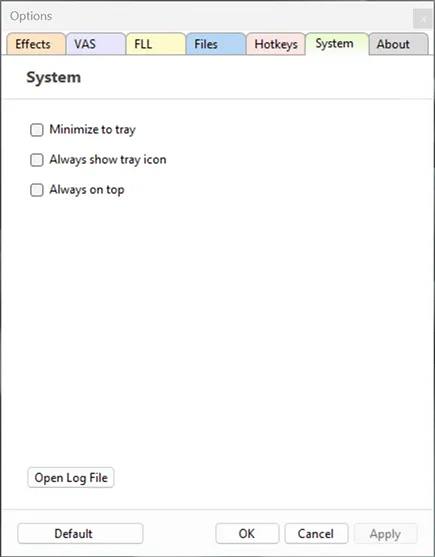
Contact support and include the log file: in NowSmart Audio Recorder, go to Options > System > Open log file, then copy its content into your message. Detailed information helps diagnose the problem.
Related articles
Still need help? Browse all NowSmart Audio Recorder articles or contact support.
Start with the free version
The free version of NowSmart Audio Recorder records up to 5 minutes per file. NowSmart Audio Recorder Pro removes the limit and adds Trim for a one-time USD 9.99.